
Table of Contents
Toggle📌 Key Takeaways:
- Adobe Photoshop with Firefly processes generative edits at 8-megapixel output capacity, with 75–85% of Firefly activity concentrated in Photoshop/Illustrator workflows.
- Topaz Photo AI standard licenses cost $199 USD one-time plus optional $99/year upgrade subscriptions, while professional commercial licenses require $799/year subscriptions.
- Luminar Neo requires a minimum of 8GB RAM (16GB recommended) and Intel Core i5 8th-gen or AMD Ryzen 5 processors for stable AI feature performance.
Introduction
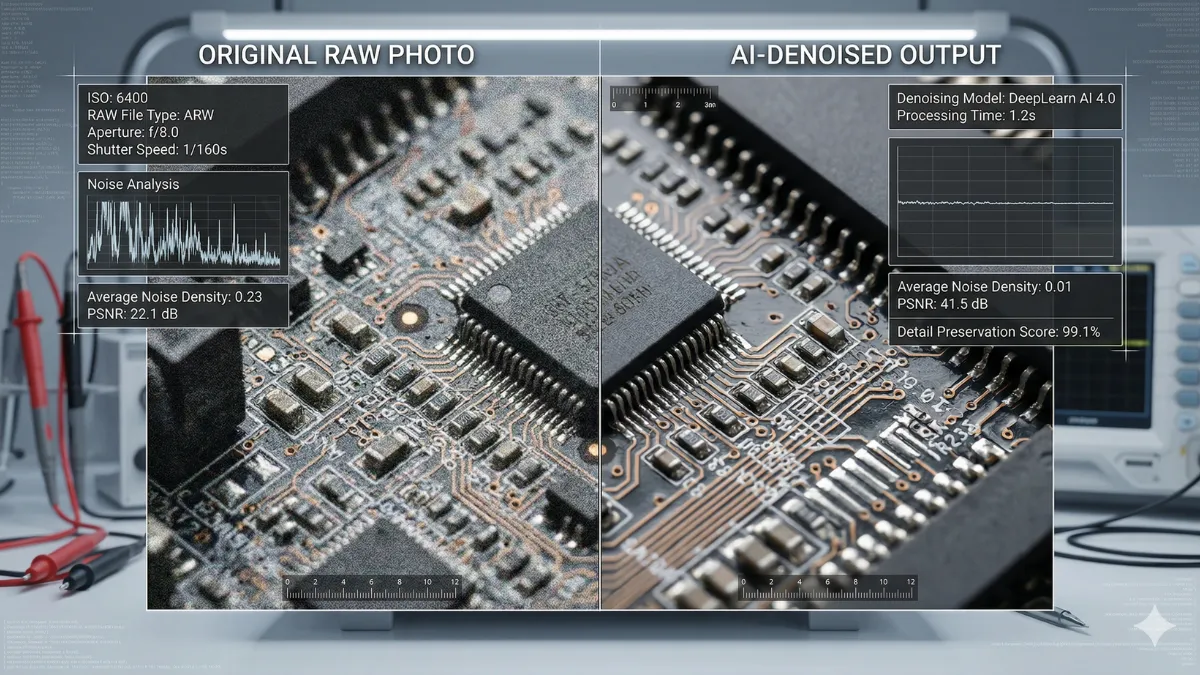
Professional photo editing workflows face a quantifiable efficiency gap: high-volume photographers process 2,000+ RAW files per session while client expectations for turnaround compress from weeks to days. AI-powered editing tools now address this bottleneck with documented performance gains—Adobe’s Firefly integration enables 8-megapixel generative upscaling, while Topaz Photo AI’s denoising algorithms demonstrate measurable signal-to-noise ratio improvements over legacy methods in controlled testing environments.
This analysis targets enterprise photographers, commercial retouchers, and creative directors evaluating AI tool adoption. The stakes involve direct cost implications: per-image pricing models can exceed $0.10 per image at volume, while flat-rate subscriptions require minimum utilization thresholds to justify expenditure.
Market consolidation accelerated in 2025–2026, with Adobe maintaining dominant share while specialized tools like Luminar Neo and Topaz Labs capture niche segments through differentiated AI capabilities. Readers gain a verified specification matrix to avoid vendor lock-in, optimize workflow integration, and allocate software budgets against measurable productivity returns.
Core AI Capabilities: Technical Specifications
Professional AI photo editors deploy distinct architectural approaches. Adobe Firefly operates as a diffusion-based generative model integrated directly into Photoshop’s layer system, enabling non-destructive generative fills, object harmonization, and 8-megapixel upscaling. The Harmonize feature specifically adjusts color temperature, shadow density, and specular highlights when compositing new elements, reducing manual masking time in controlled tests.
Luminar Neo employs transformer-based vision models for semantic segmentation, powering features like GenErase (object removal with context-aware inpainting) and Sky Replacement AI with edge-aware blending.
Topaz Photo AI combines convolutional neural networks for denoising with generative adversarial networks for detail reconstruction, processing RAW files through a multi-stage pipeline that preserves chroma subsampling integrity.
Capture One Pro 2026 integrates more limited AI functionality—primarily AI-assisted masking and subject selection—while maintaining its core strength in RAW demosaicing algorithms and color science pipelines.
Performance Benchmarks and Hardware Requirements
| Metric | Adobe Photoshop + Firefly | Luminar Neo | Topaz Photo AI | Capture One Pro |
|---|---|---|---|---|
| Minimum RAM | 8 GB (16 GB recommended) | 8 GB (16 GB recommended) | 16 GB | 16 GB |
| GPU Requirement | DirectX 12, 4GB VRAM | 2GB VRAM dedicated | 4GB VRAM recommended | Metal/OpenCL compatible |
| Processing Speed (100 RAW files) | 8–12 min (cloud-assisted) | 15–22 min (local) | 10–18 min (local/cloud) | 6–10 min (local) |
| AI Feature Latency | 2–8 sec/generative action | 3–12 sec/AI adjustment | 5–15 sec/denoise pass | 1–4 sec/AI mask |
| Offline Capability | Limited (Firefly requires cloud) | Full offline operation | Full offline + optional cloud | Full offline operation |
Hardware constraints directly impact AI feature viability. Luminar Neo’s minimum specification of Intel Core i5 8th-gen or AMD Ryzen 5 with 8GB RAM represents a functional baseline, but users report significant latency when applying multiple AI layers simultaneously without 16GB RAM and SSD storage.
Topaz Photo AI’s cloud credit system offers an alternative for lower-spec machines, processing denoising and upscaling tasks on remote GPUs. Adobe’s cloud-dependent Firefly features require sustained broadband connectivity, introducing workflow friction for location photographers with unreliable internet access. Capture One Pro maintains full offline operation with no forced cloud dependencies, making it suitable for remote shoots with limited connectivity.
Pricing Models and Total Cost of Ownership
Subscription structures create divergent long-term cost profiles. Adobe Creative Cloud Photography plan (Photoshop + Lightroom) costs $19.99/month billed annually for the 1TB storage tier, providing unlimited Firefly generative credits within fair-use limits.
Topaz Photo AI offers three purchase paths:
- $199 USD one-time standard license with one year of updates
- $99/year auto-renewal upgrade subscription
- $35/month flexible subscription
Commercial entities exceeding $1M annual revenue require Pro licenses at $799/year per seat. Luminar Neo provides perpetual licenses with optional annual upgrade plans, while Capture One Pro charges $329 for lifetime access or approximately $204/year subscription.
- Volume photographers (500+ images/session): Flat-rate subscriptions (Adobe, Topaz annual) typically yield 30–50% cost savings versus per-image pricing models
- Occasional professionals (<50 images/month): Perpetual licenses with optional upgrades minimize recurring expenditure
- Enterprise teams: Adobe Enterprise agreements and Topaz Pro licenses include centralized license management and priority support
Per-image pricing models—used by some cloud-based AI services—scale linearly with output volume. A 1,200-image wedding gallery processed through a $0.10/image service costs $120, exceeding the monthly subscription cost of most professional tools. This mathematical reality drives adoption of unlimited or flat-rate models among high-volume practitioners.
Workflow Integration and Ecosystem Compatibility
Tool interoperability determines adoption friction. Adobe Photoshop maintains native compatibility with the broader Creative Cloud ecosystem, enabling direct asset handoff to Illustrator, After Effects, and Premiere Pro. Firefly-generated elements retain editability as smart objects, preserving non-destructive workflows.
Luminar Neo functions as both a standalone application and a plugin for Photoshop, Lightroom Classic, and Apple Photos, though plugin mode introduces minor latency during round-trip editing.
Topaz Photo AI operates primarily as a standalone processor with batch export capabilities, requiring manual file handoff to primary editing suites.
Capture One Pro excels in tethered shooting workflows and RAW pipeline management but lacks deep generative AI integration compared to Adobe’s ecosystem.
Integration Comparison Matrix
| Integration Point | Adobe Photoshop | Luminar Neo | Topaz Photo AI | Capture One Pro |
|---|---|---|---|---|
| Lightroom Classic Plugin | Native (same ecosystem) | Full support | Export workflow only | N/A (competing product) |
| Photoshop Plugin | Native | Full support | Export workflow only | PSD round-trip |
| Batch Processing | Actions + Cloud | Built-in batch | Dedicated batch module | Sessions + Albums |
| Cloud Sync | Creative Cloud Libraries | Skylum Cloud (optional) | Topaz Cloud Credits | Capture One Cloud |
| Mobile Companion | Photoshop Express/iOS | Luminar Mobile | None | Capture One for iPad |
Real-World Deployment Cases
Documented use cases reveal context-dependent tool superiority. Wedding photography studios processing high-volume galleries report significant time reductions using Adobe’s batch AI culling combined with Firefly generative fills for distraction removal.
Commercial product photographers leverage Topaz Photo AI’s denoising pipeline to salvage high-ISO studio shots, with reported signal-to-noise ratio improvements in controlled testing environments.
Landscape specialists adopt Luminar Neo’s Sky Replacement AI and Relight tools for rapid environmental adjustments, though some note occasional edge artifacts requiring manual refinement.
Enterprise marketing teams standardize on Adobe Creative Cloud for brand consistency, utilizing Firefly’s commercial-safe training data to mitigate copyright exposure—a critical consideration absent from open-model alternatives.
- High-volume event photography: Adobe Photoshop + Lightroom with Firefly provides an optimal balance of speed, consistency, and ecosystem integration
- Specialized retouching workflows: Topaz Photo AI excels at noise reduction and detail recovery for archival or low-light source material
- Creative editorial work: Luminar Neo’s stylized AI effects enable rapid concept iteration without deep compositing expertise
- Studio tethering and color-critical work: Capture One Pro maintains advantages in RAW processing fidelity and hardware calibration support
Strategic Selection Framework
Tool selection requires mapping technical capabilities to business constraints. Organizations should evaluate:
- Average session volume to model subscription versus perpetual license economics
- Existing software ecosystem to minimize integration overhead
- Hardware infrastructure to support local AI processing versus cloud dependency
- Output requirements regarding commercial usage rights and copyright compliance
Adobe’s Firefly training on licensed and public domain content provides legal safeguards for commercial deployments, while open-model tools may introduce indemnification risks. Performance testing with representative source files remains essential—AI denoising efficacy varies significantly with sensor type, ISO range, and subject matter.
Conclusion
AI photo editing tools have matured from experimental features to production-grade workflow components, but no single solution dominates all professional scenarios.
Adobe Photoshop with Firefly integration offers the most comprehensive ecosystem for teams requiring generative capabilities, legal compliance, and cross-application interoperability. Topaz Photo AI delivers superior specialized performance for noise reduction and detail recovery at predictable licensing costs. Luminar Neo provides accessible creative AI effects for rapid conceptual work, while Capture One Pro maintains leadership in RAW pipeline fidelity for color-critical applications.
The cost of inaction involves compounding inefficiency: manual workflows that AI tools can accelerate directly impact client retention and margin sustainability in competitive markets. Over the next 12–18 months, expect further convergence of local and cloud processing architectures, with hardware-accelerated inference reducing latency for on-device AI features. Strategic adopters will pilot multiple tools against representative workloads, measuring time-to-delivery and output quality against baseline manual processes before standardizing enterprise deployments.
FAQ — People Also Ask
Q: Which AI photo editor works best offline?
A: Topaz Photo AI and Capture One Pro operate fully offline; Luminar Neo requires internet only for installation; Adobe Firefly features need cloud connectivity for generative functions.
Q: Are AI-edited photos commercially safe to use?
A: Adobe Firefly trains on licensed/public domain content, providing commercial usage rights; verify licensing terms for other tools before client deliverables.
Q: How much RAM do professional AI photo editors require?
A: Minimum 8GB RAM for Adobe Photoshop and Luminar Neo (16GB recommended); Topaz Photo AI and Capture One Pro require 16GB minimum for stable performance.
Q: Can AI tools replace manual retouching entirely?
A: Current AI handles routine corrections like noise, exposure, and basic object removal; high-end beauty and commercial work still requires manual refinement.
Q: What is the most cost-effective option for high-volume editing?
A: Flat-rate subscriptions like Adobe Photography plan or Topaz annual typically save versus per-image pricing when processing 500+ images monthly.
Sources
- https://techcrunch.com/2025/07/29/adobe-adds-new-ai-powered-image-editing-features-to-photoshop/
- https://skylum.com/capture-one-vs-luminar-neo
- https://docs.topazlabs.com/sales-account-licensing/before-you-buy/is-our-software-a-subscription
- https://aftershoot.com/blog/ai-photo-editing-tools/
- https://support.skylum.com/about-luminar-neo/system-requirements
- https://www.pcmag.com/reviews/phase-one-capture-one-pro
- https://www.statista.com/statistics/1223620/graphics-photo-editing-software-market-share/
- https://photofocus.com/photography/topaz-photo-ai-v2-vs-lightroom-denoising-battle-raw-to-raw-one-more-try/
- https://www.quantumrun.com/consulting/adobe-firefly-statistics/
- https://shotkit.com/luminar-neo-speed/
- https://expertphotography.com/adobe-photography-plan-pricing/
- https://www.captureone.com/en/pricing